
You will not be allowed to compare more than 4 products at a time
View compareArtwork & Templates
Using Your own artwork?
Artwork Guidelines for Custom Desk Pads
Thank you for choosing The Desk Pad Co. To ensure high-quality printing, please follow the artwork setup instructions below, or download one of our ready-made templates.
General Artwork Requirements:
■ File Format: PDF, AI, PSD or PNG (300dpi minimum)
■ Colour Mode: CMYK preferred (RGB accepted)
■ Bleed: 20mm on each edge (total 40mm added to width and height)
■ Safe Zone: Keep key text/images 20mm inside from edges
■ Resolution: Minimum 300dpi
■ Fonts: Convert to outlines or embed fonts
■ File Naming: Use business name + pad size (e.g. MyBrand_900x400.pdf)
Submitting Your Artwork:
You can upload your artwork during checkout (if ready), or email it to artwork@thedeskpadco.com after ordering. Please include your order number in the email subject line.
Quick Pre-Print Checklist ✅
Before sending, make sure:
1. All important text and logos are inside the safe zone
2. Backgrounds/images extend into the bleed area
3. Colours are correct (CMYK preferred)
4. File name is correct (Use your business name + pad size)
All designs are checked for bleed, trim and safe areas, and colour matched as closely as possible for print.
Download Templates
To ensure your branded desk pad prints perfectly, we provide downloadable PDF templates for each size. These templates include bleed, trim, and safe zone guides so you can position your artwork correctly. Simply open the PDF in Adobe Photoshop, Illustrator, or your preferred design software, create your design within the safe zone, and export your final file as a high-resolution PDF or PNG. Always keep important text and logos inside the safe zone, and extend backgrounds or images to the bleed line to avoid white edges when printed.
Download all artwork templates below (zip file) for illustrator. If you require another format please let us know.
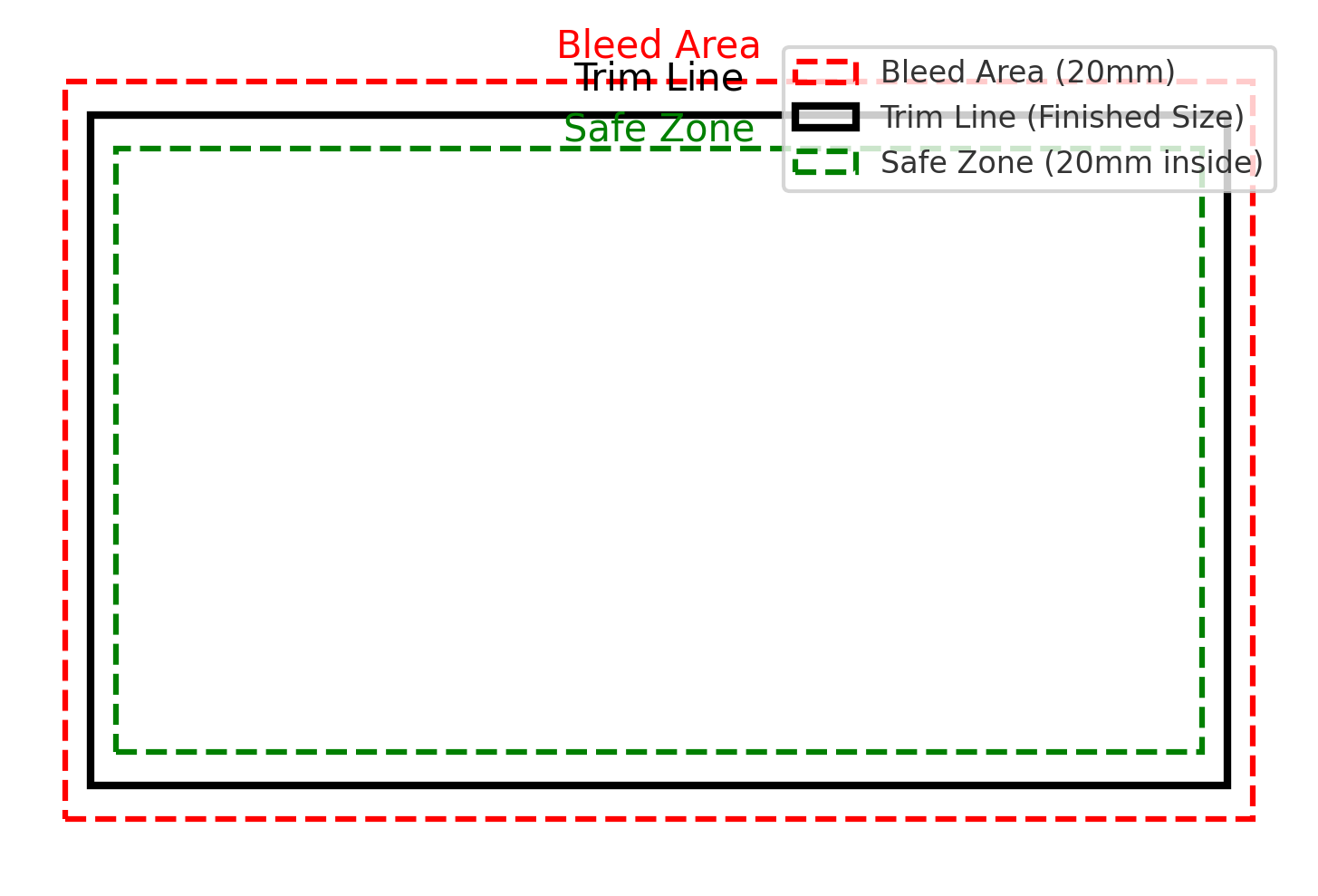
Explained
THE BLEED/TRIM/SAFE ZONES
Bleed Area (Red Line)– Extend your background or graphics into this area to avoid white edges after trimming.
Trim Line (Black Line)– This is the finished size of your desk pad after cutting.
Safe Zone (Green Line)– Keep all logos, text, and important elements inside this area to ensure they are not cut off.
Need Help With Design?
If We’re Creating Your Artwork
Design & Artwork Guide
Once you’ve placed your order, email your artwork or details to artwork@thedeskpadco.com with your order number in the subject line.
What to send
- Your logo (AI, EPS or PDF preferred. PNG also accepted)
- Brand colours, fonts or style guidelines (if available)
- Any text you’d like included (e.g. website, tagline, contact details)
- Website link so we can see our brands tone
- Optional: examples or inspiration for layout/style, anything specific you want including
What happens next
- We create your design and optimise it for print
- You receive a proof to review
- We make any adjustments if needed
- Production begins once approved
If you have any issues or questions please do contact us using the online contact form here